Friday, October 31, 2014

How to install PHPRoad (phpr) framework on php 5.5

Install PHPRoad on php 5.5:

PHPRoad is a framework which is used for developing web applications. But it has some limitations like it supports only php 5.4 and older version.

This Framework is not useful in case of php 5.5 . Because, some mysql extenstions does not support php 5.5 like mysql_connect. php 5.5 only supports mysqli_connect.

So, For installation of phpRoad in php 5.5 we have to follow the following steps

Step 1:

Firstly Download the zip and extract it on your local machine.

Step 2:

Run it on browser and follow the steps (Including creating key from phproad)

Here, you will face a problem during installation and that is about 
mysqli_connect

For removing it follow the Step 3

Step 3:
 Open this file

Your_application/framework/modules/db/classes/mysql_driver.php

(a). Here edit mysql_connect to mysqli_connect

also add $this->config['database'] in its Db::$connection (Because mysqli takes 4 parameters )

(b). Change all the mysql_ to mysqli_ in this file .

After this retry it on browser.

This time it will be installed successfully.

Thanks
Ashish Ginotra

Friday, October 17, 2014

How to get all addresses with in a radius from a fixed point in database?

Get all Lat. & Lng. w.r.t. a Lat. & Lng. in a radius:

If you want to find out all the latitudes and longitudes with in a given radius from a given latitude & longitude in a database then you have to do this task.

DB Structure:

id    lat                  lng
1    37.386337     -122.085823
2    37.393887     -122.078918
3    37.394012     -122.095528
4    37.402653     -122.079353


In PHP we can use this kind of variables:

$lat = 37, $lng= -122, $radius= 28;

Now if we want to use its radius should be in miles then we will use code 3959
Now if we want to use its radius should be in k.m. then we will use code 6371

Then query is :

"SELECT *,lat, lng, ( 3959 * acos( cos( radians( $lat ) ) * cos( radians( lat ) ) * cos( radians( lng ) - radians( $lng ) ) + sin( radians( $lat ) ) * sin( radians( lat ) ) ) ) AS distance FROM table  HAVING distance < $radius ORDER BY distance "

You will get a result all the latitudes and longitude ids which are exists with in 28 miles radius from your given latitude and longitude.

Thanks
 

Friday, October 10, 2014

How to integrate oauth2 in your laravel application

oauth2 in laravel:

For integrate oauth2 in your laravel application, we have to follow these steps.

Firstly install it using composer.

Write this line in your composer.json 
"lucadegasperi/oauth2-server-laravel": "3.0.x"
and the run this command "update composer"

Now , add these lines in your provider array of this file app/config/app.php 

'LucaDegasperi\OAuth2Server\Storage\FluentStorageServiceProvider',
'LucaDegasperi\OAuth2Server\OAuth2ServerServiceProvider',

and this line in your aliases array
'Authorizer' => 'LucaDegasperi\OAuth2Server\Facades\AuthorizerFacade',

That's it, It is now integrated.

Thanks

Friday, September 19, 2014

Easy Way to upload image in Apigility

Upload Image in Apigility:

1.Firstly Create an api with specific name as i created with 'File2' in your RESTful API & create a service with name 'file'. Here my table name is also 'file' in DB.

2.Change the 'Hydrator Service Name'  - Zend\Stdlib\Hydrator\ClassMethods

3.Create a field same as your table field name & change this field 'Will this field be a file upload?'  - Yes

4.Now in your controller there are only two files:

FileCollection.php
FileEntity.php

5.Now create 4 more files there
FileMapper.php
FileResource.php
FileService.php
FileServiceFactory.php

6.Now go to module/File2/src/File2/module.php and add these functions there.

public function getServiceConfig()
    {
        return array(
            'factories' => array(
                'File2\V1\FileService' => 'File2\V1\Rest\File\FileServiceFactory',
                'File2\V1\Rest\File\FileResource' => function($sm) {
                    return new \File2\V1\Rest\File\FileResource($sm);
                },
            ),
            'invokables' => array(
                'File2\V1\File\FileEntity' => 'File2\V1\Rest\File\FileEntity',
            )
        );
    }

    public function getHydratorConfig()
    {
        return array(
            'factories' => array(
                'Zend\Stdlib\Hydrator\ClassMethods' => function($sm) {
                    return new \Zend\Stdlib\Hydrator\ClassMethods(false);
                },
            ),
        );
    }


7.Now go to your created file FileResource.php and add these here

<?php
namespace File2\V1\Rest\File;
use ZF\ApiProblem\ApiProblem;
use ZF\Rest\AbstractResourceListener;
use Zend\ServiceManager\ServiceManager;

class FileResource extends AbstractResourceListener
{
    protected $serviceManager;
    public function __construct(ServiceManager $serviceManager)
    {
        $this->serviceManager = $serviceManager;
    }
    public function create($data)
    {
        $uploaddir = '/home/ashishginotra/image/';
        $uploadfile = $uploaddir . basename($_FILES['image']['name']);
        if (move_uploaded_file($_FILES['image']['tmp_name'], $uploadfile)) {
            $data->image = $_FILES['image']['name'];
        } else {
         /*print something */
        }
        return $this->getFileService()->saveFile($data);
    }

    public function getFileService()
    {
        return $this->getServiceManager()->get('File2\V1\FileService');
    }
    public function getServiceManager()
    {
        return $this->serviceManager;
    }
    public function setServiceManager($serviceManager)
    {
        $this->serviceManager = $serviceManager;
        return $this;
    }

}
 ?>

Here 'image' is my field name  in  my table 'file'


8. Now go to your crated file FileService.php and add these here

<?php
namespace File2\V1\Rest\File;
use Zend\ServiceManager\ServiceManager;
use Zend\ServiceManager\ServiceManagerAwareInterface;

class FileService implements ServiceManagerAwareInterface
{
    protected $serviceManager;
    protected $mapper;
    public function saveFile($data)
    {
        $FileEntity = new FileEntity();
        $this->getMapper()->getHydrator()->hydrate((array)$data, $FileEntity);
        if (!is_null($FileEntity->getid())) {
            $this->getMapper()->update($FileEntity);
        } else {
            $this->getMapper()->insert($FileEntity);
        }
        return $FileEntity;
    }

    public function getServiceManager()
    {
        return $this->serviceManager;
    }
    public function setServiceManager(ServiceManager $serviceManager)
    {
        $this->serviceManager = $serviceManager;
        return $this;
    }
    public function getMapper()
    {
        return $this->mapper;
    }
    public function setMapper($mapper)
    {
        $this->mapper = $mapper;
        return $this;
    }
}


9. Now go to your created file FileMapper.php and add these here

<?php
namespace File2\V1\Rest\File;
use ZfcBase\Mapper\AbstractDbMapper;
use Zend\Paginator\Adapter\DbSelect;
class FileMapper extends AbstractDbMapper
{
    protected $tableName = 'file';
    public function insert($FileEntity)
    {
        $result = parent::insert($FileEntity);
        $FileEntity->setPostId($result->getGeneratedValue());
    }
    public function getTableName()
    {
        return $this->tableName;
    }
    public function setTableName($tableName)
    {
        $this->tableName = $tableName;
        return $this;
    }
}


10. Now go to your created file FileServiceFactory.php and add these here

<?php
namespace File2\V1\Rest\File;
use Zend\ServiceManager\FactoryInterface;
use Zend\ServiceManager\ServiceLocatorInterface;
class FileServiceFactory implements FactoryInterface
{
    public function createService(ServiceLocatorInterface $serviceManager)
    {
        $mapper = new FileMapper;
        $mapper->setDbAdapter($serviceManager->get('Zend\Db\Adapter\Adapter'));
        $mapper->setEntityPrototype($serviceManager->get('File2\V1\File\FileEntity'));
        $mapper->getHydrator()->setUnderscoreSeparatedKeys(false);
        $service = new FileService();
        $service->setMapper($mapper);
        return $service;
    }
}


11. Now go to FileEntity.php and change it as :
<?php
namespace File2\V1\Rest\File;
class FileEntity
{
    protected $id;
    protected $image;
    public function getid()
    {
        return $this->id;
    }
    public function setid($id)
    {
        $this->id = $id;
        return $this;
    }
    public function getimage()
    {
        return $this->image;
    }
    public function setimage($image)
    {
        $this->image = $image;
        return $this;
    }
}


12. Now go to 'Postman' which is your REST client application & set header Mime-type -  mulipart/form-data , select form-data Type 'file' and upload your image. You can do it also using json format and using 64 base encode format instead of file .

Thanks

Friday, September 12, 2014

How to use Filtering in Apigility

Filtering in Apigility:

After creating any api service we can use its filteration by using its backend.

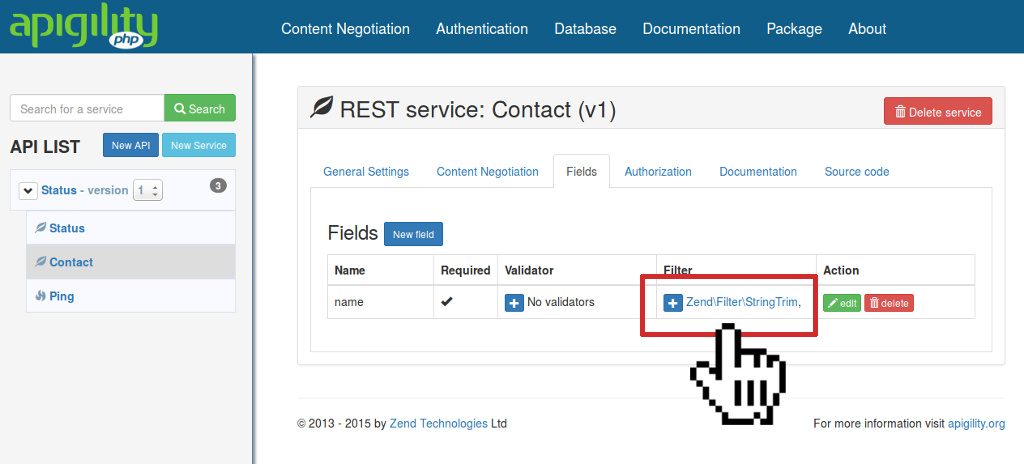
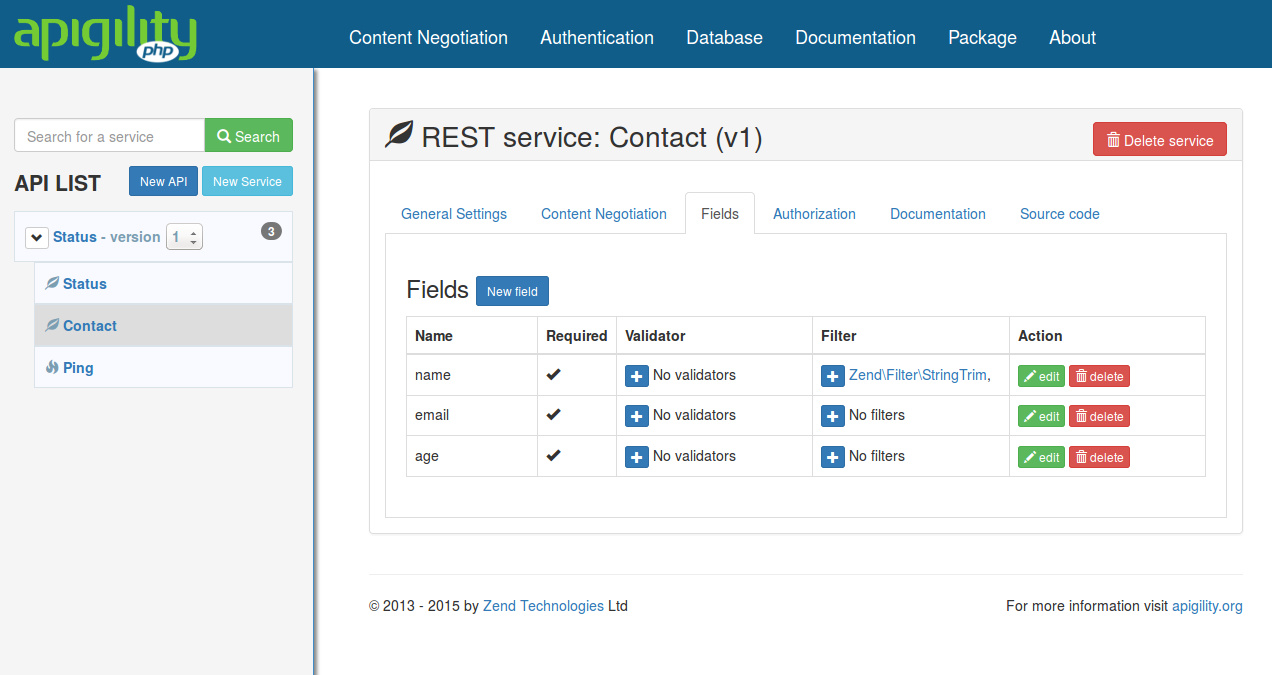
Content Validation Filtering Setup
After this if you send any request like
POST /contact HTTP/1.1 Accept: application/json Content-Type: application/json; charset=utf-8 { "age": "34", "email": "ralph@rs.com", "name": " Ralph Schindler " }

Then you will get response like
HTTP/1.1 201 Created Content-Type: application/hal+json Location: http://localhost:8000/contact/5 { "_links": { "self": { "href": "http://localhost:8000/contact/5" } }, "age": "34", "email": "ralph@rs.com", "id": 5, "name": "Ralph Schindler", "notes": null }


Thanks

Friday, September 5, 2014

How to use validations on field in Apigility

Validation in Apigility:

Its very easy to use validation on the fields in case of Apigility. For this we have to use the following steps.

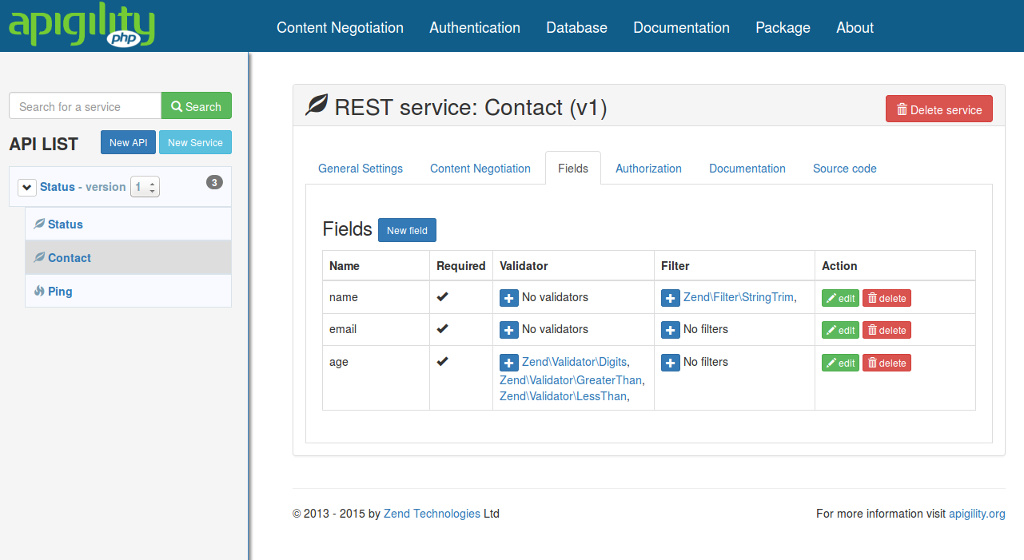
If we have fields like this:

Content Validation Required Field
Then if we send request

POST /contact HTTP/1.1 Accept: application/json Content-Type: application/json; charset=utf-8 { "name": "Ralph", "email": "foo@bar.com" }
 It will give the following response
HTTP/1.1 422 Unprocessable Entity Content-Type: application/problem+json { "detail": "Failed Validation", "status": 422, "title": "Unprocessable Entity", "type": "http://www.w3.org/Protocols/rfc2616/rfc2616-sec10.html", "validation_messages": { "age": { "isEmpty": "Value is required and can't be empty" } } }
Because age is not there.

For age's validation if we want it should be digit & should be between in 1 to 120 then we will use the following.

Content Validation Multiple Validators
 Thus we can use validations in fields

Thanks

Friday, August 29, 2014

Get Oauth2 Access & Refresh Token in Apigility (ZF2)

Oauth2 Access & Refresh Token:

For set up of oauth2 go to your config/autoload/local.php and add it in return array

'zf-oauth2' => array(
        'storage' => 'ZF\\OAuth2\\Adapter\\PdoAdapter',
        'db' => array(
            'dsn' => 'mysql:dbname=zend_db;host=localhost;charset=utf8',
            'username' => 'root',
            'password' => 'root',
        ),
        'allow_implicit' => true,
        'enforce_state' => true,
    ),


Set your configuration according to your requirements.

Create your tables accordingly this file

vendor/zfcampus/zf-oauth2/data/db_oauth2.sql

 Insert these fields accordingly your tables

client_id testclient and client_secret testpass, and a user with username testuser and a password testpass.

Password and Client Secret should be in bcrypt form

Now for testing run this in your address bar

http://localhost/oauth/authorize?response_type=code&client_id=testclient&redirect_uri=/oauth/receivecode&state=xyz
 
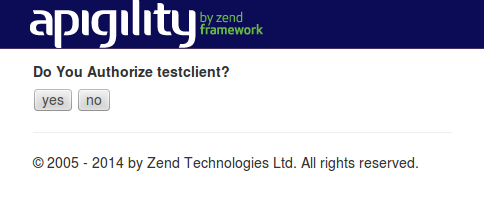
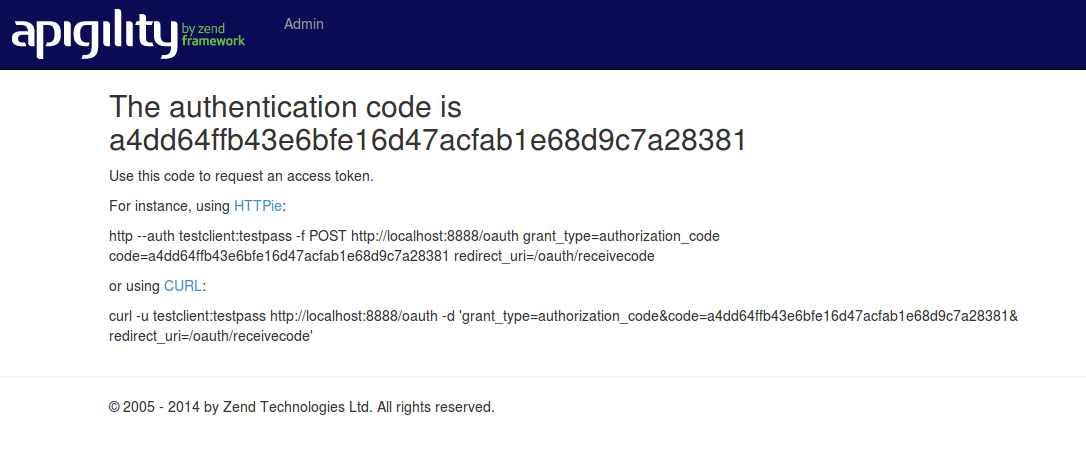
Now it will show a screen like 


Authorize
Now click on yes.

It will show a screen like

Authentication code
Now run curl command in your terminal with in 30 seconds. It will provide you access and refresh token.

Thanks